Here at Buas I’ve been working with a really talented team to make a really cool game. One of the more interesting features I have been personally working on is Volumetric fog for our game.
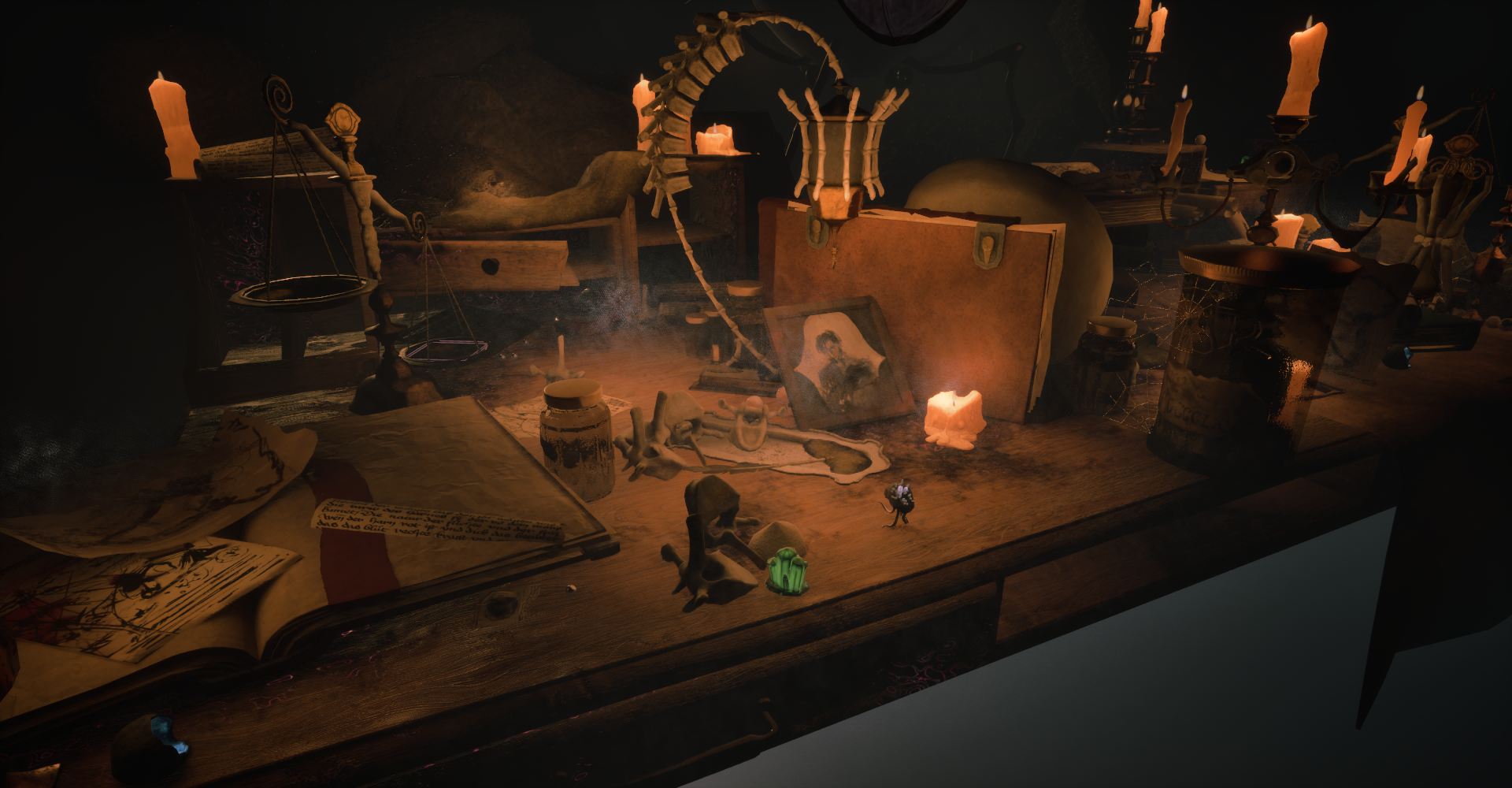 Note: this is an screenshot of early on in the development, final game might look different.
You see, each programmer had too pick their own research topic. Now I have already given a presentation on how I did it and what problems I encountered. However that presentation didn’t go into much depth of how its actually coded and was more theory than actual code.
Setup
First of all our game is a blueprint Unreal project, which means that anything we want to do in C++ is a plugin. Which means that the Fog is also a C++ plugin. You can create your own plugins directly inside of the Unreal Editor!
The Fog plugin (Named Le Sorcier) has 2 Sides: CPU-side and GPU-side. The CPU side just gathers all of the needed data and then transfers it to the GPU-side, where the shader/rendering logic actually runs.
The Fog pipeline hosts a total of 4 (compute) shaders:
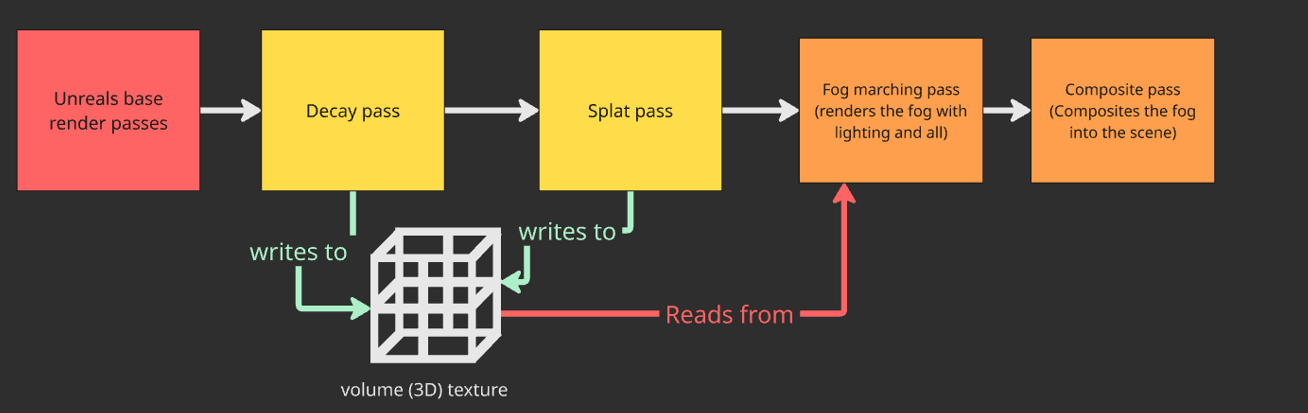
FogMarchShader: Here we do raymarching to actually render the volumetric fog.
Composite: Since our fog can be rendered at a different resolution than the actual resolution, we have a composite pass to compose the output of the Fog correctly into the final frame.
Splat pass: In order to keep track of Actors that can interact with the fog, we splat their Capsule shape to a 3d volume texture.
Decay pass In order to have the fog slowly return to its original shape after an actor walking though it we have a decay pass. Here we just slowly fade the 3d Volume texture back to empty.
CPU side
The CPU side can be divided into 3 sections:
- The Shader(s) (input definitions).
- The View extension.
- The Actor/Components
First we have Le_SorcierShaders.h in which I define all of the inputs each shader requires. For each shader we define a new class that inherits from FGlobalShader and inside we define all of the parameters we need. For example here is a snippet of the FDustFogMarchCS:
c++
 1class FDustFogMarchCS : public FGlobalShader
 2{
 3    DECLARE_GLOBAL_SHADER(FDustFogMarchCS);
 4    SHADER_USE_PARAMETER_STRUCT(FDustFogMarchCS, FGlobalShader);
 5
 6    static bool ShouldCompilePermutation(const FGlobalShaderPermutationParameters& Parameters)
 7    {
 8        return true;
 9    }
10
11    BEGIN_SHADER_PARAMETER_STRUCT(FParameters,)
12        //Light data
13        SHADER_PARAMETER_RDG_BUFFER_SRV(StructuredBuffer<FLeSorcierLightGPU>, Lights)
14        SHADER_PARAMETER(uint32, NumLights)
15        SHADER_PARAMETER(float, Anisotropy)
16
17        ///All of the other parameters....
18        ///...
19
20    END_SHADER_PARAMETER_STRUCT()
21};
Now that we have defined what data we will be using inside of the shader we can now get the data and set it up for the shader. We do this in a new class that inherits from Unreal’s FSceneViewExtensionBase.
c++
 1class FLeSorcierViewExtension : public FSceneViewExtensionBase
 2{
 3public:
 4	FLeSorcierViewExtension(const FAutoRegister& AutoRegister);
 5
 6	virtual void SetupViewFamily(FSceneViewFamily& InViewFamily) override;
 7	virtual void SetupView(FSceneViewFamily& InViewFamily, FSceneView& InView) override {}
 8	virtual void BeginRenderViewFamily(FSceneViewFamily& InViewFamily) override {}
 9
10	virtual void PrePostProcessPass_RenderThread(
11		FRDGBuilder& GraphBuilder,
12		const FSceneView& View,
13		const FPostProcessingInputs& Inputs) override;
14
15private:
16	struct FSnapshot
17	{
18        //...
19	};
20
21	FSnapshot Snapshot;
22
23	TArray<FLeSorcierLightGPU> SnapshotLights;
24	TArray<FLeSorcierInfluencerGPU> SnapshotInfluencers;
25	TRefCountPtr<IPooledRenderTarget> VolumeRT;
26
27	FTextureRHIRef SnapshotNoiseTextureRHI;
28	FTextureRHIRef SnapshotBlueNoiseTextureRHI;
29};
The main code lives inside of the SetupViewFamily and the PrePostProcessPass_RenderThread. With the SetupViewFamily gathering all of the data we need from the scene and the PrePostProcessPass uploading everything to the shader.
From our scene we need a bit of data. We store our fog settings in an Actor, so that it can be tweaked on a per-level basis. It holds no logic whatsoever, its purely there to allow people to edit the fog from inside of the editor.
c++
 1//Note these aren't all of the settings, but just a couple to give you the idea.
 2
 3UCLASS(ClassGroup = "LeSorcier", hidecategories = (Input, Collision, /*other categories*/))
 4class LE_SORCIER_API ALeSorcierFogActor : public AInfo
 5{
 6    GENERATED_BODY()
 7
 8public:
 9    ALeSorcierFogActor();
10
11    UPROPERTY(EditAnywhere, Category = "LeSorcier|General")
12    bool bEnabled = true;
13
14    UPROPERTY(EditAnywhere, Category = "LeSorcier|Volume")
15    FVector VolumeExtent = FVector(6400.0, 6400.0, 6400.0);
16
17    UPROPERTY(EditAnywhere, Category = "LeSorcier|Cloud")
18    TSoftObjectPtr<UVolumeTexture> NoiseTexture;
19
20
21    UPROPERTY(EditAnywhere, Category = "LeSorcier|DistanceFog", meta = (ClampMin = "0"))
22    float Density = 0.05f;
23
24};
First thing to note is that we gather “Snapshots” of everything, this is because some data can’t be directly uploaded to the shader.
c
 1void FLeSorcierViewExtension::SetupViewFamily(FSceneViewFamily& InViewFamily)
 2{
 3    FSceneViewExtensionBase::SetupViewFamily(InViewFamily);
 4
 5    //FSnapShot is basically just a copy of ALeSorcierFogActor, but without being an actual actor.
 6    Snapshot = FSnapshot();
 7
 8    SnapshotLights.Reset();
 9    SnapshotInfluencers.Reset();
10
11
12    ...
13}
Secondly we check if the scene holds a FogActor and if its enabled.
c
 1void FLeSorcierViewExtension::SetupViewFamily(FSceneViewFamily& InViewFamily)
 2{
 3    ...
 4
 5
 6    UWorld* World = InViewFamily.Scene ? InViewFamily.Scene->GetWorld() : nullptr;
 7    if (!World) return;
 8
 9    ALeSorcierFogActor* FogActor = nullptr;
10    for (TActorIterator<ALeSorcierFogActor> It(World); It; ++It)
11    {
12        FogActor = *It;
13        break;
14    }
15
16    if (!FogActor || !FogActor->bEnabled) return;
17
18    //Now update the SnapShot struct to reflect the data inside of the FogActor.
19
20    ...
21}
After we have gathered all of the data from the Actors and Components that we need, we gather all of the lighting data. In my case thats only the point lights, for which I save the following:
c++
1struct FLeSorcierLightGPU
2{
3    FVector3f Position;
4    float     Radius;
5    FVector3f Color;
6    float     FalloffExponent;
7};
c
 1    for (TActorIterator<APointLight> It(World); It; ++It)
 2    {
 3        UPointLightComponent* Comp = It->PointLightComponent;
 4        //Only add Visible and if they dont have the NoFog tag
 5        if (!Comp || !Comp->IsVisible() || It->ActorHasTag(LeSorcierNoFogTag)) continue;
 6
 7        FLeSorcierLightGPU L;
 8
 9        L.Position = FVector3f(Comp->GetComponentLocation());
10
11        const FLinearColor C = Comp->GetLightColor() * Comp->Intensity;
12
13        L.Color = FVector3f(C.R, C.G, C.B);
14        L.Radius = Comp->AttenuationRadius;
15        L.FalloffExponent = Comp->LightFalloffExponent;
16
17        SnapshotLights.Add(L);
18    }
Finally its time to actually setup the parameters and dispatch the shaders. Its really not that difficult since we already did most of the heavy lifting. It sometimes is tricky, because you can forgot a parameter, but it should be fine
c
 1void FLeSorcierViewExtension::PrePostProcessPass_RenderThread(
 2    FRDGBuilder& GraphBuilder,
 3    const FSceneView& View,
 4    const FPostProcessingInputs& Inputs)
 5{
 6    {...}
 7
 8    FDustFogMarchCS::FParameters* Params =
 9        GraphBuilder.AllocParameters<FDustFogMarchCS::FParameters>();
10
11    Params->CameraPos      = FVector3f(VM.GetViewOrigin());
12    Params->ScreenToWorld  = FMatrix44f(InvViewProj);
13    Params->Enabled        = Snapshot.bEnabled;
14    Params->Density        = Snapshot.Density;
15    Params->StepCount      = Snapshot.StepCount;
16    Params->MaxDistance    = Snapshot.MaxDistance;
17    //Do this for every other parameter.
18
19    {...}
20
21}
Finally its time to dispatch, which I as the following:
c
1    TShaderMapRef<FDustFogMarchCS> MarchCS(GetGlobalShaderMap(View.GetFeatureLevel()));
2    FComputeShaderUtils::AddPass(
3        GraphBuilder,
4        RDG_EVENT_NAME("LeSorcier.DustFogMarch"),
5        MarchCS, Params,
6        FComputeShaderUtils::GetGroupCount(RenderSize, FIntPoint(8, 8)));
GPU Side
Now that we have done all of that tedious setup work, we can finally do the fun shader part 🥳. For my sanity’s sake I will skip over the splat and decay pass.
First we calculate the UV, Depth and WorldPosition
hlsl
 1float3 ReconstructWorldPos(float2 UV, float DeviceZ)
 2{
 3    float2 NDC = float2(UV.x * 2.0 - 1.0, 1.0 - UV.y * 2.0);
 4    float4 ClipPos = float4(NDC, DeviceZ, 1.0);
 5    float4 WorldPos = mul(ClipPos, ScreenToWorld);
 6    return WorldPos.xyz / WorldPos.w;
 7}
 8
 9
10
11void MainCS(uint3 DispatchThreadId : SV_DispatchThreadID)
12{
13
14    uint2 HalfPixel = DispatchThreadId.xy;
15    uint2 HalfSize = uint2(ceil(float2(RenderRectSize) / DownscaleFactor));
16    if (any(HalfPixel >= HalfSize)) return;
17
18    //Early out, if we aren't enabled don't waste time on heavy math.
19    if (!Enabled)
20    {
21        OutputTexture[HalfPixel] = float4(0, 0, 0, 1);
22        return;
23    }
24
25
26    float2 FullLocal = (float2(HalfPixel) + 0.5) * DownscaleFactor;
27    float2 ViewportUV = FullLocal / float2(RenderRectSize);
28    float2 SampleUV = (float2(RenderRectMin) + FullLocal) * BufferInvSize;
29
30
31    float Depth = SceneDepthTexture.SampleLevel(PointSampler, SampleUV, 0).r;
32    float3 WorldPos = ReconstructWorldPos(ViewportUV, Depth);
33}
I first apply a layer of distance based fog, this is to add a bit of fog to the entire scene.
hlsl
1    //MaxDistance, CameraPos and Denisity are parameters
2
3    float Distance = length(WorldPos - CameraPos);
4    float DistFog  = saturate(Distance / MaxDistance) * Density * 20.0; // 20 = magic number bad.
5
6    //Note: this is just an example not actually in the final code.
7    float4 FinalColor = float4(0, 0, 0, 1);
8    FinalColor.rgb = DistFog * FogColor; // Fog color is a parameter.
Even this simple little math already brings some nice results.
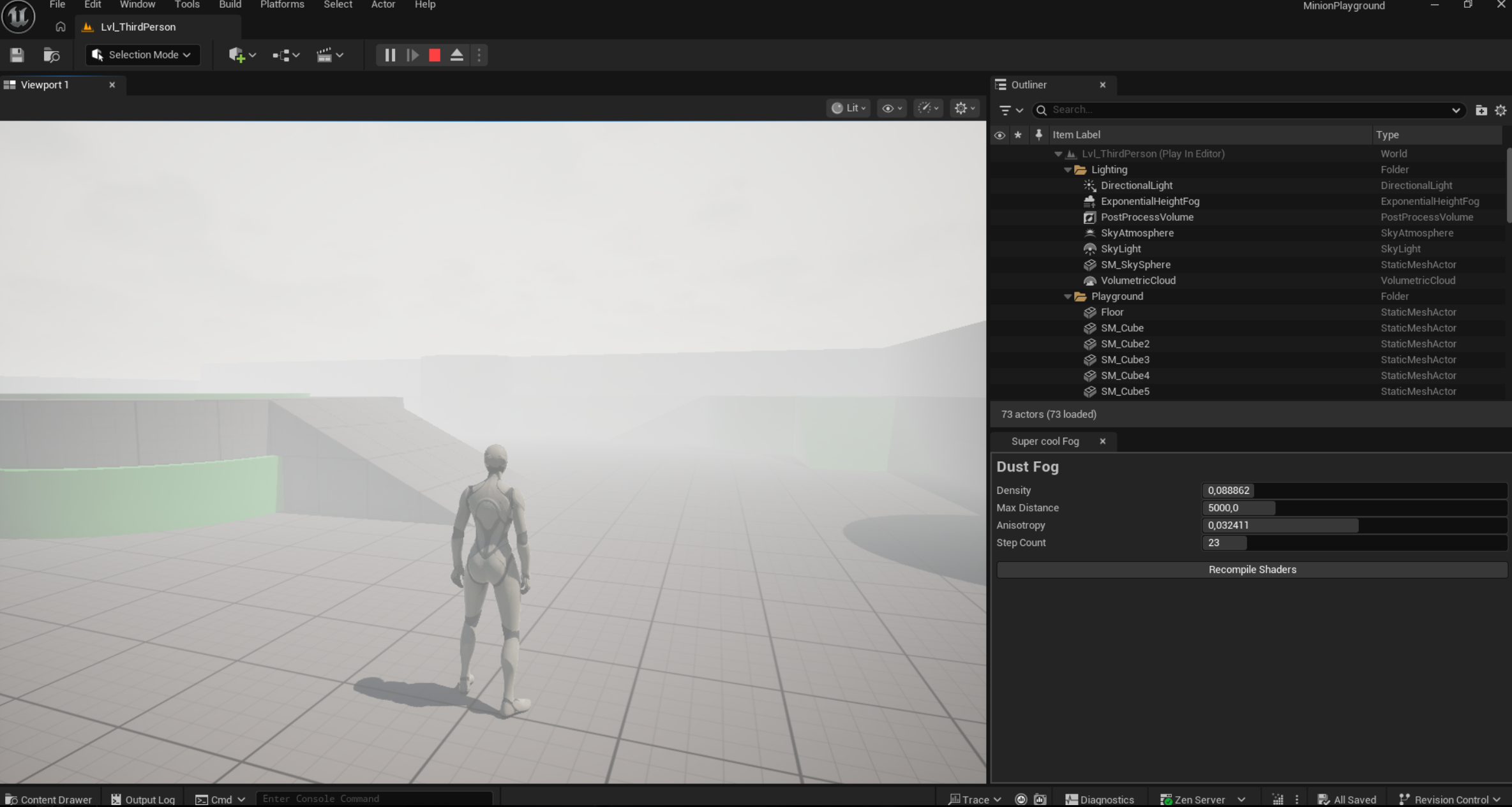
After the distance I add a “cloud” layer, which is the real sauce.
hlsl
 1    float DepthForDir = (Depth < 0.0001) ? 0.5 : Depth;
 2    float3 RayTarget = ReconstructWorldPos(ViewportUV, DepthForDir);
 3    float3 rayDir = normalize(RayTarget - CameraPos);
 4    float rayLength = (Depth < 0.0001) ? MaxCloudDistance
 5                                          : min(length(RayTarget - CameraPos), MaxCloudDistance);
 6    float stepSize = rayLength / StepCount;
 7
 8    float  transmittance = 1.0;
 9    float3 scatterLight  = 0;
10
11    ///NOTE: if you are smarter than me, make this not hard-coded and editable for artists.
12    const float LightIntensityScale = 500.0;
13
14    //little bit of jitter to avoid repetition and should be picked up nicely by Unreal's TAA.
15    float jitter = InterleavedGradientNoise(float2(HalfPixel), FrameIndex % 8);
16
17    ///Main raymarching loop
18    for (int i = 0; i < StepCount; ++i)
19    {
20        //early out, because it will be basically invisible anyways.
21        if (transmittance < 0.02) break;
22
23        float t = (float(i) + jitter) * stepSize;
24        float3 samplePos = CameraPos + rayDir * t;
25        float density = SampleWorldPos(samplePos); // SampleWorldPos is where the magic happends.
26
27        if (density < 1e-4) continue;
28
29        float stepT = exp(-density * stepSize);
30
31        float3 inScatter = 0;
32        //Calculate how much lighting should be applied
33        for (uint l = 0; l < NumLights; l++)
34        {
35            FLightGPU light = Lights[l];
36
37            float3 toLight = light.Position - samplePos;
38            float dist = length(toLight);
39            float fallof = GetFallOf(dist, light.Radius, light.FalloffExponent);
40            float cosTheta = dot(toLight, rayDir) / max(dist, 1e-4);
41            float phase = phaseHG(cosTheta, Anisotropy);
42
43            inScatter += light.Color * fallof * phase * LightIntensityScale;
44        }
45
46        scatterLight  += transmittance * (1 - stepT) * inScatter * FogColor;
47        transmittance *= stepT;
48    }
This looks relatively simple, because it is! The real magic is happening in the SampleWorldPos function, which goes as following.
hlsl
 1float Noise(float3 pointInSpace)
 2{
 3    return NoiseTexture.SampleLevel(NoiseSampler, pointInSpace, 0).r;
 4}
 5
 6//todo optimize this.
 7float SampleWorldPos(float3 worldPos)
 8{
 9    float heightMask = 1.0 - abs(worldPos.z - CloudCenterZ) / CloudThickness;
10    if (heightMask <= 0.0) return 0.0;
11    heightMask = saturate(heightMask);
12
13    float clearFactor = 1.0;
14    float3 localWind = 0;
15
16    //calculate the wind amount + direction
17    {
18        float3 VolumeMin = VolumeCenter - VolumeExtentWS * 0.5;
19        float3 VolumeMax = VolumeCenter + VolumeExtentWS * 0.5;
20
21        if (all(worldPos >= VolumeMin) && all(worldPos <= VolumeMax))
22        {
23            float3 volUV = (worldPos - VolumeCenter) / VolumeExtentWS + 0.5;
24            float4 vol = VelocityVolume.SampleLevel(VolumeSampler, volUV, 0);
25            clearFactor = 1.0 - saturate(vol.a * VolumeClearStrength);
26            if (clearFactor < 0.01) return 0.0;
27            localWind = vol.rgb * vol.a * VolumePushStrength;
28        }
29    }
30
31    float3 p = worldPos * NoiseScale + WindOffset * Time + localWind;
32
33    float3 pHalf = p * 0.5;
34    float3 warp;
35
36    warp.x = Noise(pHalf + float3(Time * 0.01, 0, 0));
37    warp.y = Noise(pHalf + float3(0, Time * 0.02, 0));
38    warp.z = Noise(pHalf + float3(0, 0, Time * 0.03));
39    p += (warp - 0.5);
40
41    float distRatio = saturate(length(worldPos - CameraPos) / MaxCloudDistance);
42
43    float base = Noise(p);
44
45    //Use if-statements here to avoid using more Noise() than needed, because its expensive.
46    if (distRatio < 0.75)
47    {
48        base += Noise(p * 2.0) * 0.5;
49        if (distRatio < 0.4)
50        {
51            base += Noise(p * 4.0) * 0.25;
52            base *= (1.0 / 1.75);
53        }
54        else
55        {
56            base *= (1.0 / 1.5);
57        }
58    }
59
60    float shape = saturate((base - CloudCoverage) / (1.0 - CloudCoverage));
61    return shape * heightMask * CloudStrength * clearFactor;
62}
This produces something along the lines of this:
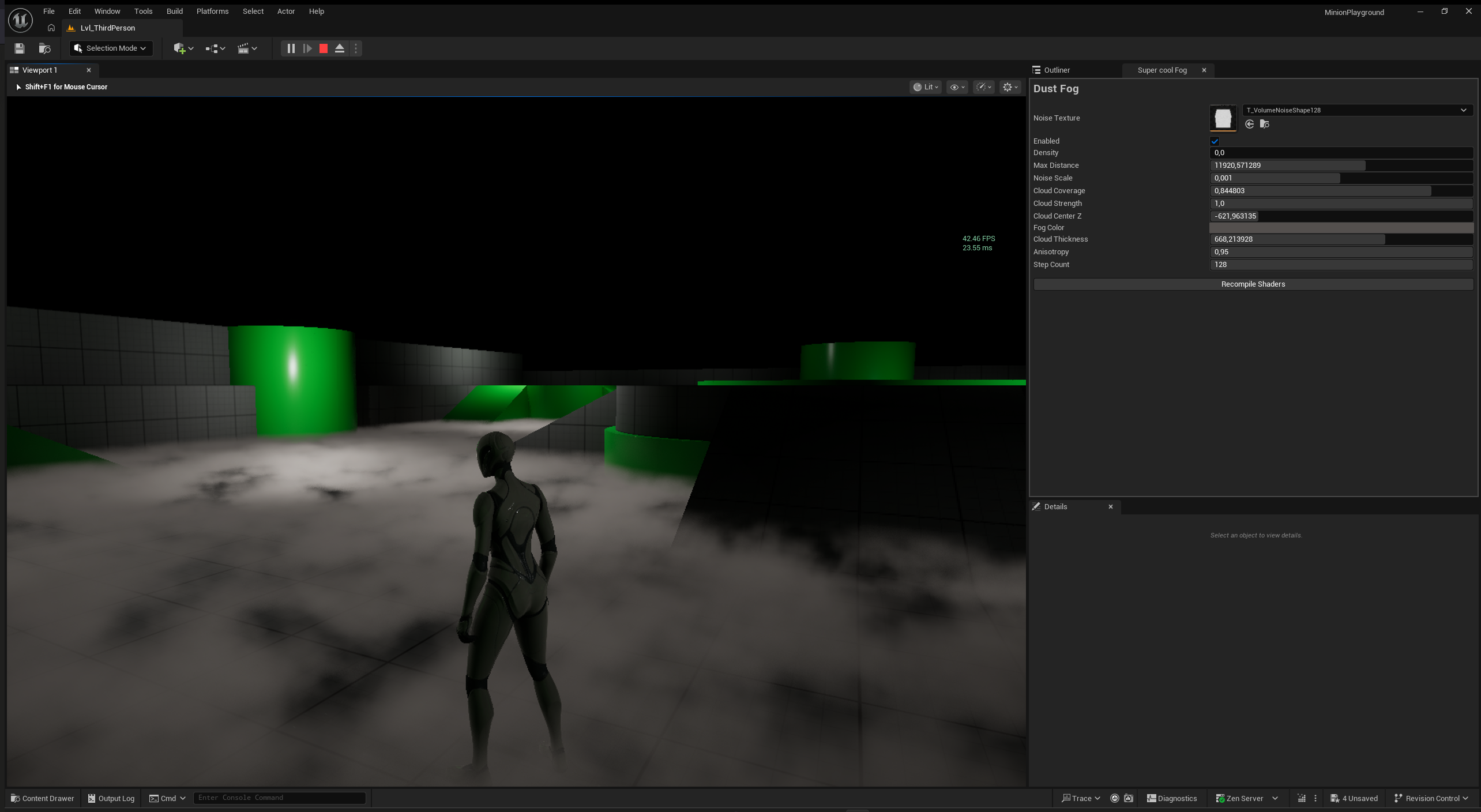
Finally i get the final color as the following:
hlsl
1    float distT = 1.0 - DistFog;
2    float finalT = transmittance * distT;
3
4    //I do " * (1.0 - finalT)" to disable the clouds behind any translucent objects.
5    float3 fogRgb = FogColor * (1.0 - finalT) + scatterLight;
6
7    OutputTexture[HalfPixel] = float4(fogRgb, finalT);
Tips
I learned many thins while developing the fog, so I wanted to leave some tips for anyone trying to do something similar:
Materials
Unreal engine support many different kinds of materials so please keep them in mind while creating your fog. So materials such as Subsurface Scattered ones are directly encoded in the ColorBuffer you get. Some aren’t like Emissive materials and will require specific solutions to solve. (For emissive materials i just added a new component that would make the fog treat the object as if it were a point light).
Translucency
Translucency can be a big hassle and something even Unreal’s local fog volumes don’t fix. Its a problem because you want your fog to stop in the volume, but continue after. This means that you will need to know when a point in space is in a translucent object or not, which is very difficult.
Performance
One thing I haven’t mentioned yet, but performance can be tricky. Especially if you do many steps and many noise samples. You can try downscaling your fog like I did or lowering the amount of steps you do, but It can look noisy very quickly.
Froxels (Frustum voxels)
Not mentioned here, but Froxels can potentially fix the translucency and emission problem. In fact, many triple-A games use this solution (Such as Red dead redemption 2 & The last of us part 2), with also Unreal’s built in Volumetric fog using it.
Use Actors as Config
Please don’t be as stubborn as me and just use Unreal actors as a way to get your settings reflected in the editor. Its nice and you are making great use of Unreal’s built-in serialization and reflection systems. It also means that config are per level and not uniformly.
Going beyond
This isn’t all of what my current implementation has to offer. As mentioned previously my fog is also interactive. It can move out of the way when the player walks through it and slowly returns to its original shape. Its a fun challenge if you got the time, but I wont end up using it because it doesn’t really fit into the game.
Thank you for reading, don’t fog it up! or maybe do fog it up 🤔